Limited offer · Save 10% ($111) · Closing in00d00h00m00s
Contact actions · from Overhaul

GHL contact action buttons: one tap from the phone call to the workflow

A service writer finishes a call and needs to send the estimate follow-up. In stock GoHighLevel that is the tag box, typing, picking and checking. With a contact actions bar it is one tap on "Estimate sent", and the workflow does the rest.

Tap the tags live

One tap starts a workflowForms fill custom fieldsRespects user permissions

  • Estimate sentStarts the 24-hour estimate follow-up workflow
  • Declined workStarts the 30, 60 and 90-day declined-work reminders
  • Waiting on partsSends the "parts ordered, we will text you" update
  • Ask for reviewFires the review request after pickup
  • Example set for a repair shop; your tags and workflows are your own.
Test drive

Press the buttons, tap the tags

The bar below has shop tags and a Log vehicle form. Tap a chip, open the form, drag the bar by its grip, then try other positions and color rules.

Action bar

Live

Raising it on the lift…

A color per tagThe real contact actions bar with shop-style tags. Tap a quick tag, open Log vehicle, or drag the bar by its grip. Nothing is saved in this preview.

The short answer

Why put buttons on the contact page?

Because tagging by hand is where follow-up dies. A quick tag chip turns "open the tag box, type, pick, check" into one tap, so the workflow that listens for that tag starts every time, even on a busy Saturday.

Stock contact page

  • Tags typed by hand, spelled three ways
  • Custom fields buried in a long record
  • Follow-ups skipped when the shop is busy

With contact actions

  • One tap adds the exact tag
  • A short form fills the right fields
  • Workflows start every single time
What you get

Built for the front counter

Everything the bar can do, set up in the editor's Contact actions tab.

Quick tags

One-tap chips that show whether the contact has the tag, with their own colors, and tap again to remove it.

Buttons that start workflows

Add, remove or toggle tags with one press, so any tag-triggered workflow starts on cue.

Pop-up forms

Text, number, date, drop-down, email, phone or link fields, each mapped to a custom field.

Notes on the contact

Optionally log which tag changed and by whom, or which field changed from what to what.

Place it anywhere

6 starting positions, draggable, remembered per user.

Updates at once

New tags and field values show without a reload; if GoHighLevel refuses a change, the chip flips back and says why.

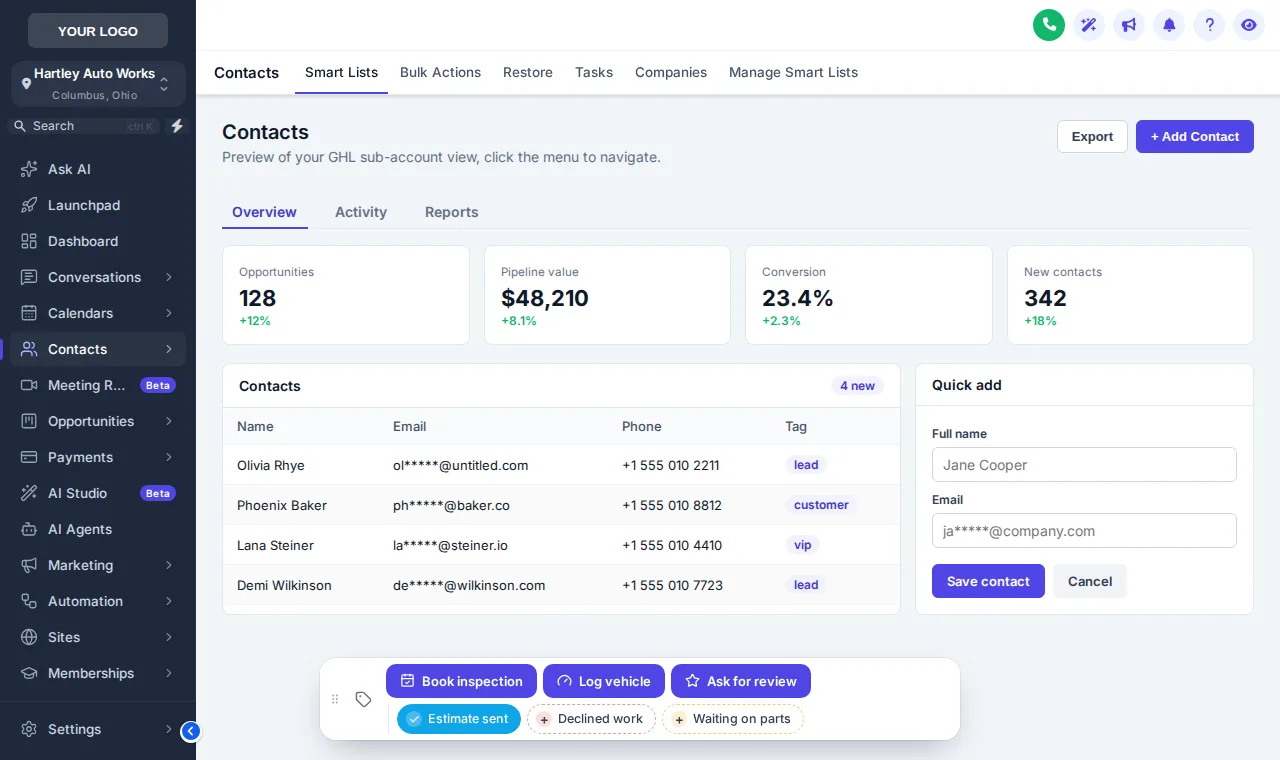
GoHighLevel contact page with a contact actions bar: Book inspection, Log vehicle and Ask for review buttons plus Estimate sent, Declined work and Waiting on parts quick tags
Contact actions bar with shop quick tags
The job

How do you set up contact actions?

  1. List the daily jobs

    Write down the tags your team adds by hand every day, and the custom fields they fill most, such as vehicle and mileage.

  2. Add chips and buttons

    In the Contact actions tab, add a quick tag chip for each tag and a button for each short form, with colors, icons and messages.

  3. Point them at workflows

    Use those tags as "tag added" triggers in your GoHighLevel workflows. Save, and the bar appears on every contact page.

Packages

Contact actions come with the Overhaul

$377 once, lifetime access, with mega menus and the dashboard and pipeline designers.

Tier 1 · one-time

Tune-Up

$157once, lifetime access

Not in Tune-Up

All 27 themes, 11 UI kits, dark mode, your colors and logo, and all 16 animated login page designs.

Workspaces
1
Team members
3
Access
Login emailed within minutes (max 24 hours)

Best for: An agency or a single shop that wants GoHighLevel to stop looking stock, without changing how anybody works inside it.
Starts hereTier 2 · one-time

Overhaul

$377once, lifetime access

✓ Contact actions bar included

Everything in Tune-Up plus mega menus, a floating menu, the dashboard and pipeline designers and the contact actions bar.

Workspaces
2
Team members
5
Access
Login emailed within minutes (max 24 hours)

Best for: Agencies running several repair-shop sub-accounts whose service writers live in contacts, conversations and the pipeline.

Tier 3 · one-time

Full Rebuild

$777once, lifetime access

✓ Contact actions bar included

The whole customizer: popups, social proof, calculators, floating widgets, leads into GoHighLevel and a white-label editor.

Workspaces
3
Team members
10
Access
Login emailed within minutes (max 24 hours)

Best for: Agencies reselling GoHighLevel to auto repair shops under their own brand, who want popups and widgets on their websites too.

Inspection checklist

Contact action questions

10 questions answered

Q01

What are GHL contact action buttons?

A bar on the GoHighLevel contact page with quick tag chips and buttons. One tap adds or removes a tag, which can start a workflow, and a button can open a short form that fills the contact’s custom fields.

Q02

How does a button start a GoHighLevel workflow?

Buttons add, remove or toggle tags. Any workflow with a "tag added" or "tag removed" trigger starts from one press, so a service writer never opens the tag box.

Q03

Which custom fields can a form fill in?

Any custom field in the sub-account, by name, key or id. Each form field has a type, such as text, paragraph, number, date, drop-down, email, phone or link, and can be required.

Q04

Does it work with GoHighLevel permissions?

Yes. It uses GoHighLevel’s own API with the signed-in user’s session, so a user can only do what their GoHighLevel permissions already allow.

Q05

Can it leave a note on the contact?

If you switch it on: a note saying which tag was added or removed and by whom, or which field changed from what to what.

Q06

Where does the bar sit on the page?

In one of 6 starting positions. People can drag it by its grip, it remembers the spot, and a double-click on the grip puts it back.

Q07

Can different sub-accounts get different buttons?

Yes. Each chip and button can be shown in every sub-account or only in the ones you list.

Q08

What buttons suit an auto repair shop?

Estimate sent, Declined work, Waiting on parts and Ask for review as quick tags, plus a Log vehicle form for year, make, model, mileage and next service date. Try that exact set in the preview.

Q09

Which package includes contact actions?

The Overhaul ($377) and the Full Rebuild.

Q10

Is anything saved when I use the preview here?

No. The preview runs the real bar on a sample page, but nothing is sent anywhere. Inside GoHighLevel the same presses update the contact.

Book a bay

Every follow-up, one tap away

The Overhaul unlocks the contact actions bar, mega menus and both designers for $377, paid once.

Compare all three packages

One-time payment by card through Stripe secure checkout. Lifetime access, no monthly fee.

GHL Customizer accounts are sold by Car Mechanic Snapshot and run on the GHL Customer Care customizer platform; you customize and install everything yourself. GoHighLevel and HighLevel are trademarks of their owner; we are an independent business and are not affiliated with, endorsed by or sponsored by HighLevel. Screens shown are our own captures of the customizer's live preview on sample data. Prices updated .

Lifetime account

Get your GHL Customizer account

Account (one-time, lifetime)
Total today, , paid once, lifetime access

Secure payment by Stripe. Card details go straight to Stripe and never touch this site. We use your details only to run this job, as described in our privacy policy. Your login (email and a temporary password) is emailed as soon as payment completes, usually within minutes and at most 24 hours. If anything fails, our team sets the account up by hand within 24 hours. We never ask for your GoHighLevel login.