
It is 9:20 on a Tuesday night. A guy notices his brakes grinding on the way home, and he is not calling you now because you closed at six. So he types “brake shop near me.” Three shops come up. Two have a “Book” button right on the map. Yours says “Call.” He taps the one that lets him grab 10am Thursday in a minute. You never knew he existed.
That is the leak nobody sees, because it never rings. It is a customer who decided, correctly, that your shop was more work to book than the one down the road. The phone was the barrier.
The fix is online booking that actually works for a repair shop, not a generic “request an appointment” form that still needs a callback. Done right, the customer books a real time against your real capacity, tells you what the car is doing, gets an instant confirmation, and lands in your reminder system. Here is the whole system, stage by stage, with the copy you can steal and the places it breaks.
What’s on this page
- Why the phone is costing you bookings
- What a lost booking is actually worth
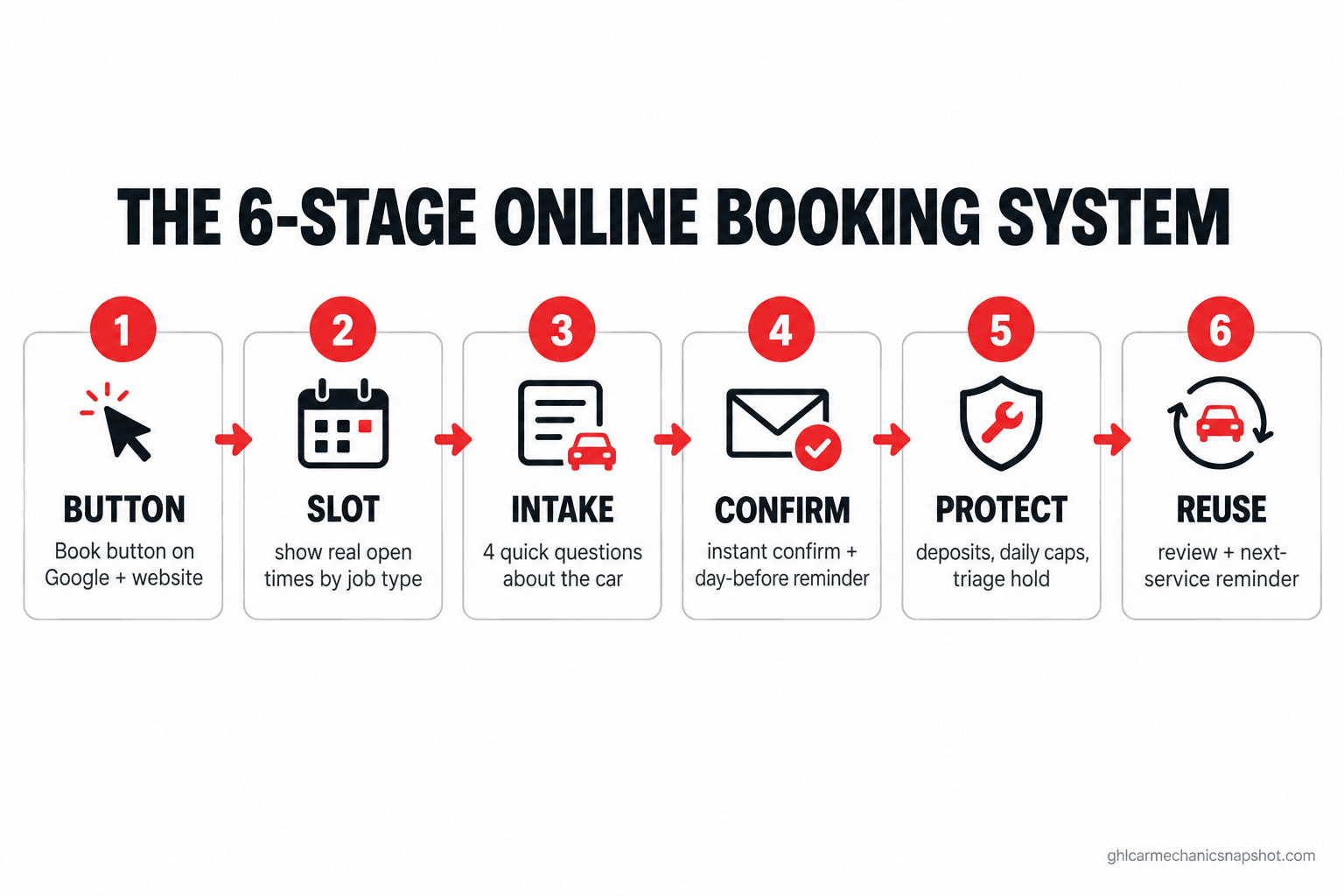
- The six stages of a shop booking system
- Stage 1: put the button where they already are
- Stage 2: show real times, not a request form
- Stage 3: ask the four questions that make the bay ready
- Stage 4: confirm in seconds and hand off to reminders
- Stage 5: guard the schedule on the jobs that matter
- Stage 6: turn the booking into the next booking
- Run it at your size
- The texting rule that rides along with booking
- Objections
- FAQ
Why the phone is costing you bookings
The phone made sense when it was the only option. It is now the slowest, most fragile way a customer can give you money, and your newer customers treat it that way.
Start with who is calling. About 80% of Americans say they do not generally answer their cellphone when an unknown number calls, per the Pew Research Center. That cuts both ways: your callback is the unknown number they ignore, and a new customer weighs calling you against a competitor who does not make them.
Then there is when they decide. A check-engine light gets noticed on the drive home, at night, on the weekend, when you are closed and a phone number cannot catch them. In the Cox Automotive Service Industry Study, 56% of consumers said they would choose one service provider over another based on the ability to schedule online, and 91% of those who booked online were highly satisfied.
What a lost booking is actually worth
The national average auto repair labor rate hit $132 an hour in 2026, ranging from about $85 to $197 by state across more than 10,000 shops, per the Tekmetric labor rate report. A brake job is a couple of billable hours plus parts margin, a timing belt or transmission diagnostic a lot more. The guy who booked elsewhere at 9pm was not a $40 oil change. He was a real repair order, now a repeat customer at the shop that made it easy.
Speed matters too. In a study of 1.25 million sales leads, the Harvard Business Review found firms that responded within an hour were nearly seven times more likely to have a meaningful conversation than those who waited one more. A “request a time” form answered the next morning is on the wrong side of that math; online booking that confirms instantly is on the right side, at 9pm, with nobody there.
Auto repair labor rates per hour, 2026, for the US average and three example states, per the Tekmetric labor rate report. At these rates, a booking you lose because it was too hard to make is several billable hours gone, before parts.
The six stages of a shop booking system
Buying a scheduling widget is not the same as running a booking system. A booking that sticks runs through six links: button, slot, intake, confirm, protect, reuse. The chain breaks at whichever link you skipped, usually the slot or the protect.
Stage 1: put the button where they already are
Do not make customers find your booking page. Put the link where the decision happens: your Google Business Profile so the “Book” button shows on the map and in search, your website header and every service page, and the end of every text. The 9pm brake customer never visits your homepage; he sees you on the map, and the button has to be right there.
Stage 2: show real times, not a request form
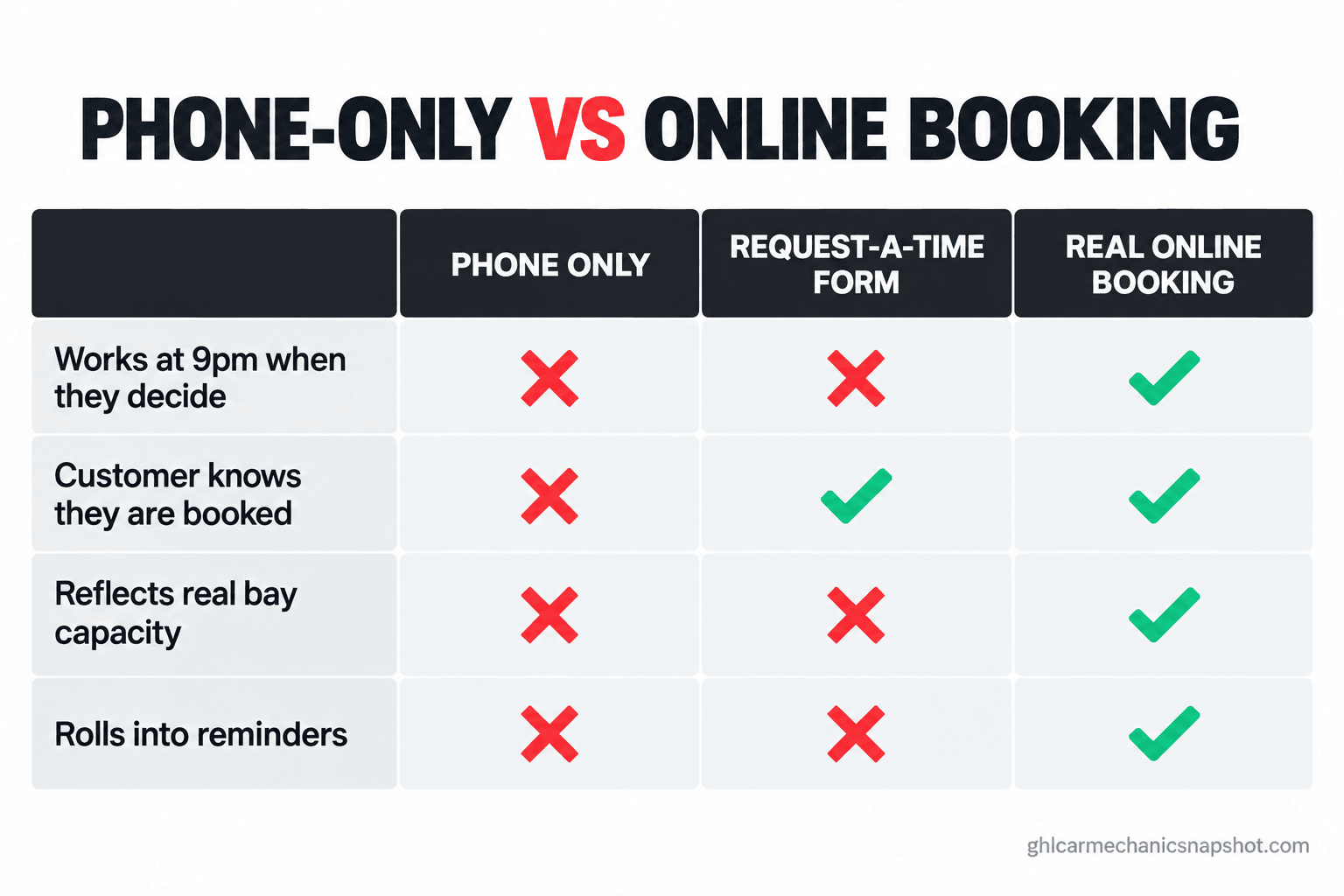
This stage separates a booking system from a glorified contact form. A “request a time” box that waits for a callback has not removed the phone tag, it has added a delay to it, and the customer still does not know if they are booked. Real online booking shows actual open slots tied to your capacity, and when the customer picks one, they are booked. The trick for a shop is that your capacity is not “one chair per hour.” It is bays, techs, and job length: a 20-minute oil change and a four-hour brake job cannot both be “the 2pm slot.” A booking tool set up for a shop lets you define appointment types with real durations and cap how many of each you take per day.
| What you need it to do | Phone only | Request-a-time form | Real online booking |
|---|---|---|---|
| Works at 9pm when they decide | No | Sort of, but no confirmation | Yes, instantly |
| Customer knows they are booked | Only after a call | No, waiting on a callback | Yes, on the spot |
| Reflects real bay and tech capacity | In your head | No | Yes, by job type |
| Rolls into reminders automatically | No | Rarely | Yes |
Stage 3: ask the four questions that make the bay ready
A booking with no information is a phone call you still have to make. The point of self-booking is that the car shows up and you already know what you are looking at. You do not need 15 fields, you need four: the vehicle, what it is doing in the customer’s own words, whether it is drivable, and the best number to text. That is enough to prep the bay and pull a part if it is obvious. Every extra required field is a customer who bails, so make the rest optional and let a photo ride along.
Stage 4: confirm in seconds and hand off to reminders
The moment the customer books, two things fire: an instant confirmation, and the appointment drops into the same reminder system that protects every other booking on your calendar. A confirmation that lands instantly feels real; one that goes quiet makes the customer call to check, and you are back on the phone.
The booking also has to be defended: one made at 9pm Tuesday for next Thursday is the kind that gets forgotten. A confirmation on the spot plus a day-before reminder with an easy way to confirm or reschedule turns a self-booking into a filled bay. This is the same no-show insurance covered in why auto repair customers no-show. Online booking without it is just a faster way to make no-shows.
This is the booking flow we wire up for shops on GoHighLevel so it runs without the front desk touching it. If you would rather see it working than build it, book a walkthrough.
Stage 5: guard the schedule on the jobs that matter
This is the stage owners worry about: double-books, junk appointments, a four-hour job dropped on a day with no lift free. The fix is not to keep the phone wall up, it is to put guardrails on self-booking. Three do almost all the work. First, cap the heavy jobs per day, so oil changes cannot block the bay you need for real work. Second, put a triage hold on anything you must see first: the customer books a diagnostic slot, not the repair, and you confirm the repair window afterward. Third, take a deposit or card hold on high-value and long jobs. A customer who puts $50 down shows up; a free click at midnight is the one that ghosts you.
Stage 6: turn the booking into the next booking
The booking you just took is the start of a channel you own. After pickup, the same thread asks for a review while the experience is fresh, and weeks later reminds the customer about the service they passed on.
That loop pays for the system twice. The review brings in the next stranger searching the map, the core of getting more Google reviews on autopilot. The reminder rebooks the same customer without a cold call, how you stop good customers drifting back to the dealer, covered in why your best customers went back to the dealer. Put the booking link in both, or every rebook starts from scratch.
Run it at your size
The six stages are the same everywhere. What changes is your weak link.
Solo operator or two-person shop. You answer the phone with your head under a hood, so the button and the after-hours slot are your highest-value pieces: they book the night customer you were never going to catch, and the confirmation runs without you. Keep guardrails simple, a deposit on anything over a couple of hours and a daily cap.
Mid-size shop, three to eight techs. Your weak link is capacity and the handoff: bookings pile onto the wrong tech, or a big job lands on a day with no lift free. Set real appointment types and per-day caps by job length, sync every booking to one shop calendar, and use the triage hold. This is also the size where you likely pay for a shop system with some scheduling, so check what your auto shop software already costs and whether its booking module does these six stages first.
Multi-bay or multi-location group. Your risk is inconsistency: one location confirms instantly and defends the schedule, another lets bookings sit. Standardize the appointment types, deposit rules, caps, and reminder cadence across locations, and watch booking-to-show rate per store. The location with the most no-shows skipped Stage 4 or Stage 5.
The texting rule that rides along with booking
The moment your booking system texts customers, which it should, federal law comes with it. The good news is that booking texts are the safe kind: a confirmation, reminder, or diagnostic-result update is a transactional message about a car the customer brought you, on the lowest consent standard.
The trap is the one that bites every shop, bolting a promotion onto a transactional text. “You’re confirmed for Thursday” is transactional. “You’re confirmed for Thursday, and refer a friend for $20 off” is marketing, and one promotional line can reclassify the whole message under stricter written-consent rules. Get it wrong and the damages are real, at $500 per text and up to $1,500 if a court finds it willful, under 47 U.S.C. 227. You also register the number under A2P 10DLC so carriers do not filter your confirmations. Keep booking texts about the appointment, register, and honor STOP. The full breakdown is in why your service reminder text is legal but the refer-a-friend line makes it illegal.
Straight answers to the objections
“My customers are older, they won’t book online.” Some will not, and you still answer the phone for them. But booking is not there to convert the regulars who already call. It catches the new customer deciding at 9pm who was never going to call at all. You lose nothing by offering both.
“I need to look at the car first. I can’t let people just book repairs.” Right, and that is what the triage hold in Stage 5 is for. The customer books a diagnostic slot, not the repair. Self-booking the diagnostic still saves you the phone tag of getting the car in the door.
“Won’t I get double-booked or flooded with junk appointments?” Only if you skip the guardrails. Per-day caps, real durations by job type, a triage hold, and a deposit on big jobs prevent exactly that. A tool synced to one shop calendar cannot sell a slot twice, and a deposit solves the junk-appointment fear.
“I already pay for Tekmetric or Shopmonkey. Do I need something else?” Maybe not. Most shop systems include some scheduling, and the gap is usually the setup, not the software. Build the six stages on what you have first, and you do not need to be technical to do it: you make a few setup choices and the tool runs the rest. If you are still comparing platforms, our head-to-head on Tekmetric, Shopmonkey, AutoLeap and Shop-Ware covers where each one’s scheduling fits.
Frequently asked questions
Online booking for auto repair shops questions
What is online booking for an auto repair shop?
A system that lets a customer book a real appointment against your actual bay and tech capacity, from your Google Business Profile, website, or a text link, without calling. It shows real open slots by job type, collects a few vehicle details, confirms instantly, and drops the booking into your reminder system. That is different from a 'request a time' form, which still needs a staff callback to confirm.
Won't online booking cause double-bookings or no-shows?
Not if you set guardrails. Sync bookings to one shop calendar so a sold slot can't be sold twice, set real durations and per-day caps by job type, put a triage hold on anything you must diagnose first, and take a deposit on high-value jobs. Then pair every booking with an instant confirmation and a day-before reminder.
Do customers actually want to book auto service online?
Yes. In the Cox Automotive Service Industry Study, 56% of consumers said they would choose one service provider over another based on the ability to schedule online, and 91% of those who booked online were highly satisfied. With about 80% of people ignoring calls from unknown numbers (Pew Research), the phone is now a barrier for a large share of would-be customers.
Can I let customers book repairs, or only diagnostics?
Both, if you match the booking type to how you work. Straightforward jobs like oil changes, rotations, and brake pads can be booked directly with a realistic time block. Anything you must see first is booked as a diagnostic slot with a triage hold, so you confirm the repair window after you look. That keeps you from promising a time you can't hit.
Do I need new software, or can my current system do this?
Start with what you have. Most shop management systems include a scheduling tool, and the gap is usually the setup, not the software: no Google Book button, no real-time slots tied to capacity, no reminder handoff. Build the six stages on your current tool first, and look at something new only if it genuinely can't do them.
Back to that 9:20pm brake customer
Run the opening again with the system in place. The guy with the grinding brakes sees your shop’s “Book” button, picks 10am Thursday against a real open slot, types “grinding when I brake, safe to drive,” and gets a confirmation before he puts the phone down. The day before, a reminder lands and he replies C. Thursday morning the bay is prepped, because you knew the car and the complaint. He never called, and he never had to. The booking you used to lose to the shop down the road came in while the lights were off. For the automations that ride on top of booking, see five automations every auto repair shop should run.